Inability to Collaborate
Hybrid environments, remote teams, and digital communication are here to stay and have become more common than in previous years. Employees should be able to access an online workplace, despite their physical location. Sometimes, however, digital workplaces make collaboration difficult or altogether impossible.
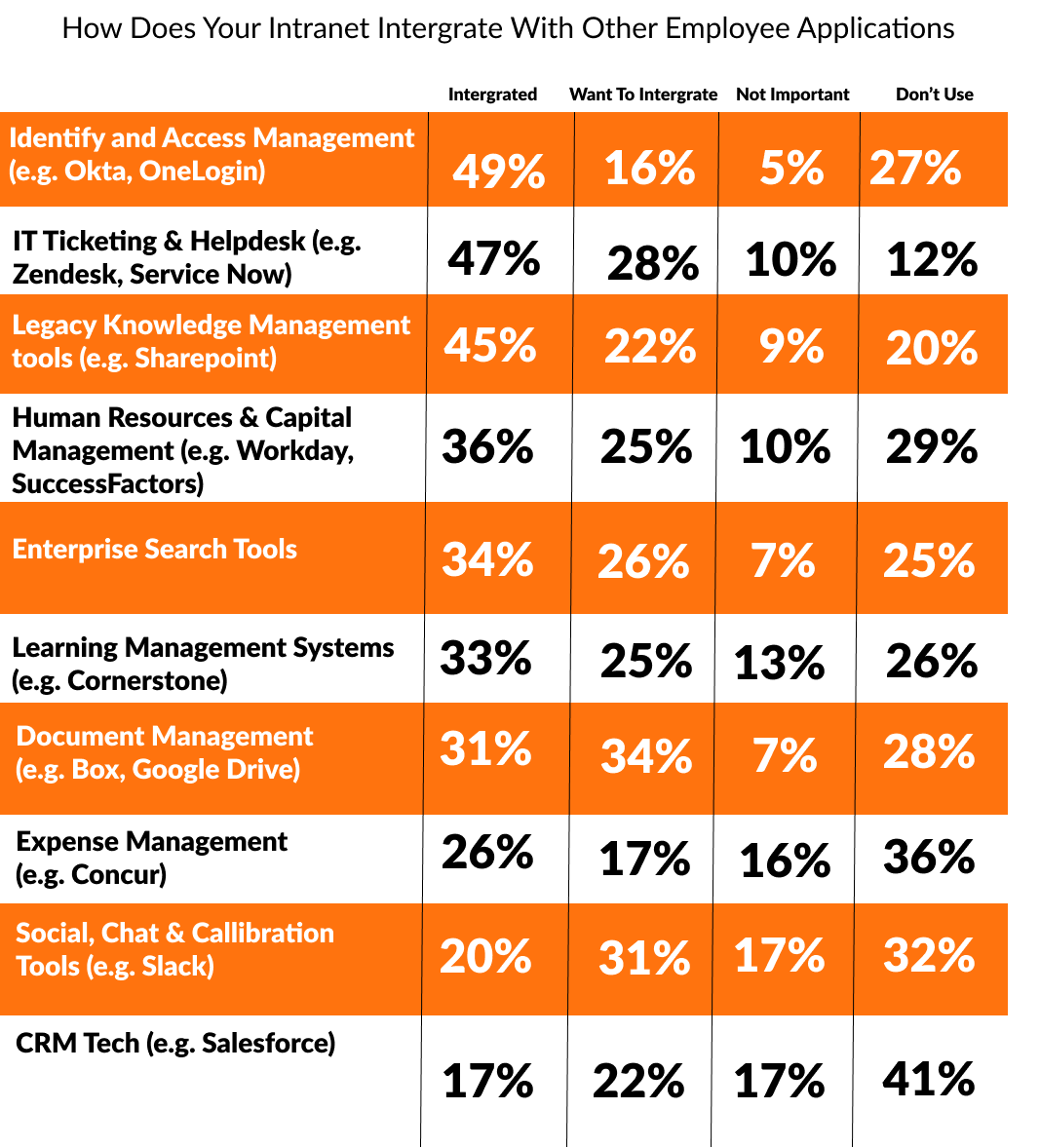
Collaboration doesn’t happen overnight or because an organization wants it to happen. A lot of the time, it is a technology issue caused by multiple or ineffective tools. For example, a number of employees aren’t able to share documents or work on documents together, and there is no control over the document versions or permissions. An intranet can unite your company, providing a place for employees to share ideas, projects, and documents, as well as stay connected to company news and updates. A centralized location for corporations to utilize communications and messaging is essential.
Ineffective Communication
This is a challenge that starts shortly after adopting an intranet. A portal has no streamlined process, no ability to communicate, and a lack of knowledge of where to post information. This stems into two main issues.
- Information — How often can information be kept up to date without seeming stale? Consistently posting the same things will inevitably cause employees to glaze over updates. What kinds of information goes where on the intranet? Dealers choice, however it needs to be in a well thought out manner in order to have the best UX possible. Is there a tagging practice that has been developed to enable the best ability of the search function? The search function is just as important as the archiving of information, it’s not enough to only have information archived if the search is ineffective.
- Ownership — Who is supposed to be updating content, when should it take place, and should it be in one spot or multiple spots on the intranet? Is this the job of marketing and internal communications, H.R. or maybe a combination of the two? Who determines what information is relevant and goes on the feed – human resources, higher management, or maybe all department heads collaborate? How often are the feeds updated – daily, weekly, or monthly? The more updated the intranet stays, the more useful it is to everyone using it. Ownership is imperative for an intranet, so it is not a waste of time, resources, and money.
If you cannot solve these two questions, your portal will not be as effective as desired. There are too many communication channels with no structure for all to be useful at the same time. Information and the ownership of said information is crucial to effectively communicate to stakeholders.
Portal Usability
Some intranets also suffer from very poorly structured content with complicated site navigation. Being able to customize the navigation over time, and structure it with necessary content will make sure an intranet fits your organization. This ties into a tailored experience for individuals by allowing unique customization for their own personal dashboards. The search function should also be useful, not a burden on users to find information. As previously stated, this is important to keep engagement high and avoid frustration. Lastly, a great way to keep usability with stakeholders is to minimize the number of clicks needed and maximize user navigation.
Keeping the portal updated is a key to keeping employees engaged. If materials, designs or user experience become old and hard to use, employees will become more frustrated and will stop using the intranet. It’s crucial to keep your intranet portal up to date and to review it annually.
Don’t Forget…
Remember, the portal is designed to make lives easier. A well-planned and executed portal will address more than the surface concerns of a few stakeholders or a department. Avoiding the problems listed above is crucial, along with selecting the right vendor.
After going through this blog, the first question may be “Well, where do I start?” We have the answer! First, start with where your current organization is in terms of employee satisfaction and engagement, digital ease of use, remote working structure, and more. Every company is unique and has its own individual technology needs. To solve these challenges, you need an expert, a thought leader, and an overall professional. Is it time to get a new intranet or a consultation about your current one? Competitors aren’t waiting in this increasingly digital world, so why should your organization? If you’re tired of these intranet issues, it’s time to solve them. Take our assessment below to get started!